I recently happened upon readest, a free open-source EPUB and PDF reader that is available on iOS, Windows and Linux. Its neatest feature (among the many it has) is the ability to sync reading progress with KOReader servers. Turns out booklore provides an API that mimics KOReader’s sync.
Setting it up is actually really easy. The setting is under the Devices tab in settings. You’ll find it under sync configuration. The “Enable KOReader Sync” toggle will be disabled until you fill out the username and password fields. Simply put whatever you like there and hit save next to Settings Management, then flip the toggle.
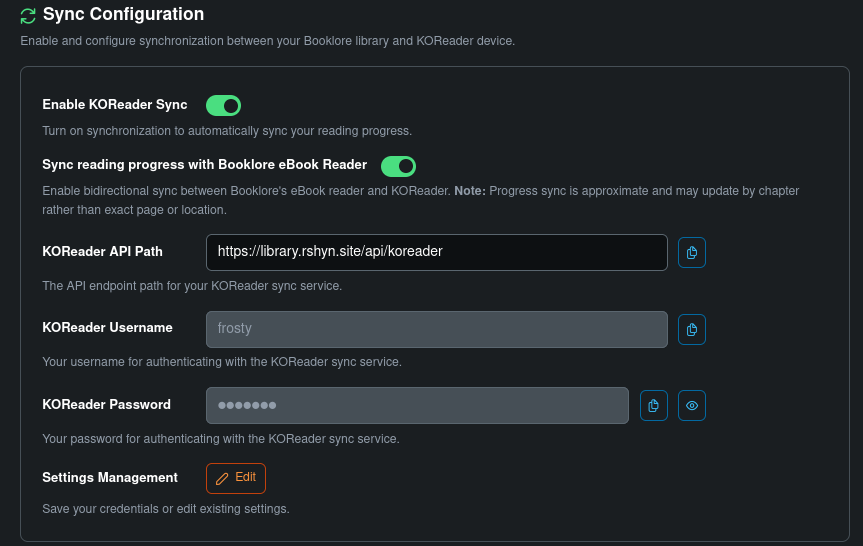
Then, copy the information that you have to the Integrations tab in Readest. The sync is a bit finicky, but it works. I recommend downloading the books directly from your Booklore instance’s OPDS so that the metadata matches. When you want to save your progress, hit Push Progress under the KOReader Sync dropdown when you’re done reading on that device.
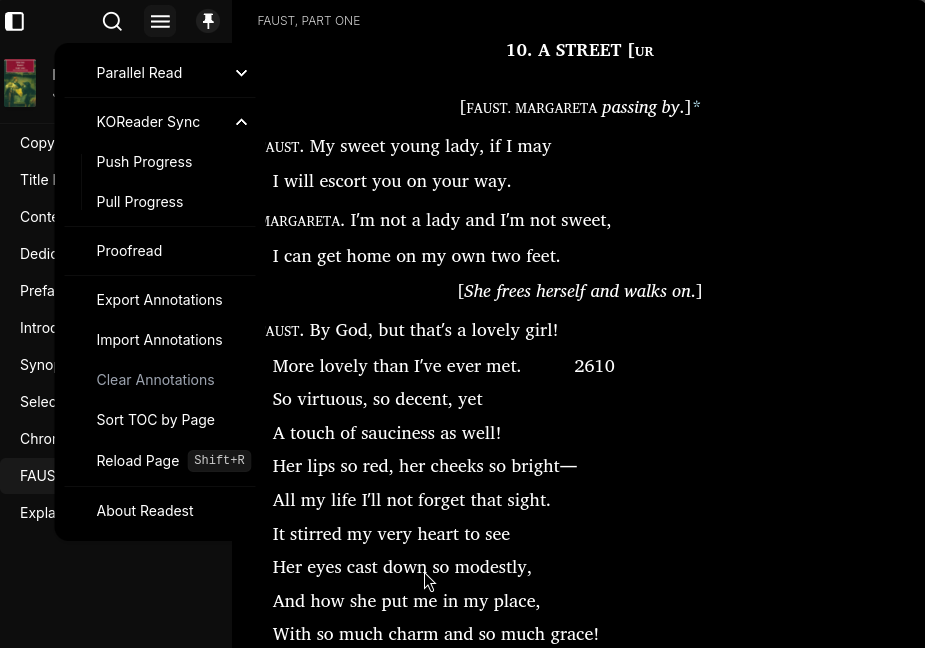
This solved an issue that bugged me for the longest time and prevented me from reading on my computer - I can finally sync reading progress between different devices without having to pay a subscription (or feed metadata to random third party sites)!